Showing posts with label internet. Show all posts

Finally! An internal DNS Server that works (for me)!

So it's been much too long since I wanted to do this, but thankfully, I have finally discovered the solution for which I can serve up my own DNS server for internal LAN things, but still have an external host that administers my public website!

My scenario and quandry was this:

Right now, our company is having our website (and inherently our domain) maintained and hosted with an outside provider. This is fairly simple to set up, and all the back-end stuff is kept nice and tidy on some remote server that isn't likely to have any serious power outages, so our public content is pretty much guaranteed to always be live.

However, our domain and its DNS records were being handled by this service as well (company.com, www.company.com, ftp.company.com, etc). This wasn't too much of a problem, because before we didn't care.

Then I decided, hey it would be really nice to have a server where we could host internal company things such as an internal website, network storage area, svn/git, etc. This was easy. Just get the boss to buy us a fancy new server computer from Dell, install a good, solid Linux server OS on it and get going. And it worked no problem.

And it turns out our public (internet) IP was static as well, which meant that I could get up on that public webhost DNS record and add a nice little subdomain for our public IP to let us serve up internal.company.com with a few port forwarding configurations through our NAT router and cable gateway. Awesome!

However, there was one big issue. For because we are set up with a two-step configuration to connect to the internet (router signs into cable modem as a client, and cable modem signs into Comcast), we were not able to pull up internal.company.com from INSIDE the company. Of course, what sort of issue is that, when you can just dial in the reserved IP 192.168.10.2 from inside? Well...that's confusing. Not that confusing to someone who knows what they're doing, but definitely confusing to someone who is just trying to make it work.

But how should I set it up so that if someone from outside the LAN is trying to access internal.company.com they get routed to our Comcast public IP, but if they're inside the LAN, they get routed to 192.168.10.2?

I had toyed with the idea of an in-house DNS for quite a while. Yet, everywhere I read, there was a ton of legaleze mixed into the documentation: "You shouldn't have records to a name that you don't own, you shouldn't create records for a domain that already has a master record somewhere else, etc." This was annoying. How would I ever be able to even play with the idea of a DNS server if everyone kept telling me I shouldn't do it the only way I saw it could be done?

But then I had this thought: "The entire internet is not going to be able to access my DNS server as long as I don't forward the port it uses through the router. Nobody in the Internet Policing Agency is going to even KNOW that I have a DNS server that is routing domains that I don't own. And after reading all the "this is what DNS actually does" documentation with its levels of looking up names all the way from the website-level DNS servers to the root DNS servers, no actual computer out there will ever use my public IP address to look up DNS records, because I simply won't let the world know it's even possible! I'm not qualified as a valid DNS host, nor do I ever intend to be.

I found a pretty good tutorial at http://doxfer.com/Webmin/BINDDNSServer that was super descriptive in telling me just exactly what DNS did. And then I found the entire article was based around a cool browser-based interface called Webmin. Turns out I can pretty well administrate the entire server over that service. I'm definitely using it for other stuff!

But anyway, after a bit of reading, I decided to give using it a shot.
  1. I couldn't very well test out a DNS server without configuring a client to route through it for lookups, so I changed my LAN adapter settings in Windows to look at 192.168.10.2 for a primary DNS server. Since I don't care about standards with the system, I decided to leave the secondary field blank, which it took.
  2. I installed BIND9 via aptitude: sudo apt-get install bind9 bind9-host bind9-doc
  3. Next I grabbed Webmin from Sourceforge to prepare for its installation: wget http://prdownloads.sourceforge.net/webadmin/webmin_1.660_all.deb though if this article is outdated (which in a few months it probably will be) the actual page to download will be more likely at http://webmin.com/download.html.
  4. Tried installing it once and it failed due to a few missing libraries, so I grabbed those as well after reading the actual installation instructions from the Webmin wiki: sudo apt-get install perl libnet-ssleay-perl openssl libauthen-pam-perl libpam-runtime libio-pty-perl apt-show-versions python
  5. Now, since I had attempted to install Webmin from the .deb file before, it automatically asked in no simple terms if I wanted to retry after aptitude finished installing those libraries. I apparently said yes to this (sudo apt-get -f install) and webmin was installed from some cache somewhere. However, if I had done it right, I would have next tried: sudo dpkg --install webmin_1.660_all.deb
  6. Once Webmin was installed and autoconfigured, I was then prompted to navigate to http://server:10000 in my browser:
  7. Once logged in via Webmin, I navigated to Servers > BIND DNS Server: 


    However, this only let me access the internet as the internet, the internal network by their hostnames and the local computer as itself.
  8. Now all the tutorials I found said that you should only create a master zone if you own it, and if this was the primary location for its record (to avoid clashing with the actual one or something). However, again, this was all for experimentation, and I had to put rules and standards aside. So I clicked Create master zone in the zone section of the BIND DNS Server configuration window.
    After all, creating a slave zone only lets you ask an already-existing master for its records. You can't create DNS records in a slave zone.
  9. From here, I specified the Zone type as Forward, the Domain as company.com, left Records file set as automatic, set, as was recommended on the above-mentioned tutorial, to put the server hostname (server) in the Master server field, and for the heck of it put my email in the email field. The rest I left as default.
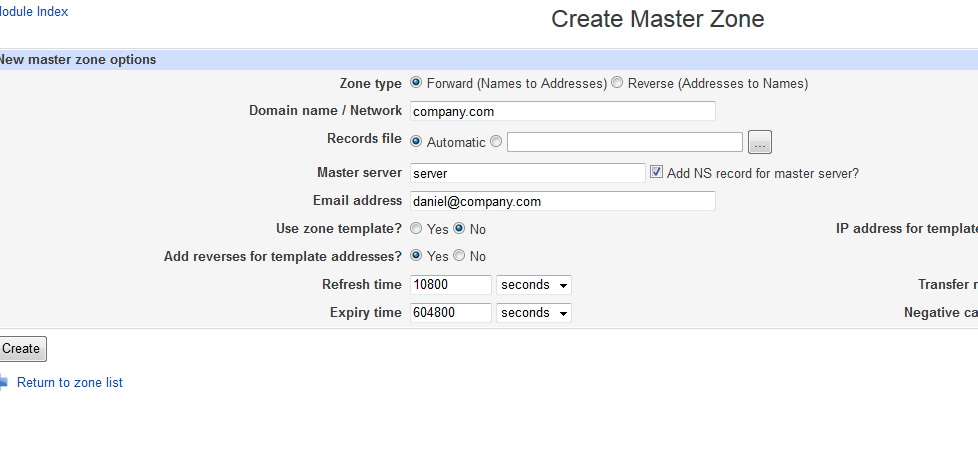
  10. With no problems whatsoever, I was brought to the Edit Master Zone screen. 
  11. Clicking the Address icon, I was brought to an A-NAME record entry screen, where I entered the Name internal and the address 192.168.10.2. I left Update reverse? as Yes which is its default.
  12. To test it out, I clicked the Apply Zone link at the top right of the screen. However, since I left Time-To-Live as default, I had to wait a few minutes before it actually worked. In time, I was able to open another browser window and successfully load the internal webpage at internal.company.com!!

    Sweet! So it works the way I want it. The internal subdomain successfully loads my internal webpages. But what about the external site that was hosted elsewhere, along with its domain name record which is also hosted elsewhere? Well, I've told my own internal domain name server that I'm controlling the root company.com now as the master record, when in all actuality the official root and www subdomains are being controlled offsite by some other company. I guess this is what they meant by making sure there was only one master zone. Well, thankfully BIND can take care of this issue as well!
  13. Backing out to the Master Zone Config screen by clicking the Return to record types link at the bottom the page, I was able to click the Name Server icon. This record type allows me to enter a subdomain and pass all the DNS lookup work off on some other server...which is exactly what I needed to do.
  14. In the Zone Name field, I first entered @ which is the default root prefix for any domain name. In the Name Server field, I then entered our website hosting DNS server ns1.external.net. Of course, since public, qualified DNS servers have two to three (and in the case of root domain servers, 13) actual machines doing all the work, I created a new Name Server record for the root subdomain with our host's second dns server name ns2.external.net. I also repeated this process for the www and ftp subdomain.
    In all reality, this seems a lot like the experience one might have with connecting through several devices to get onto the Internet, or port forwarding a port through multiple levels of network firewalls. The cable modem thinks the entire network consists of one client: the router, with an IP address of 10.1.10.48. But the ROUTER sees the rest of the computers on the LAN and serves them up with 192.168.10.xxx IP's. In the same way, the router sees 192.168.10.2 as the actual machine with the webserver that we tell it to forward through to the outside world. But to the router, the outside world is only its single wire from it to the modem on the 10.1.10.xxx network that the modem is serving. And the modem thinks that the router at 10.1.10.48 is the machine with the webserver that it needs to forward through. A lot of information passing just to get information to the outside world, and by then, who knows where it goes with all the routing and hopping?
  15. In any case, I'd gotten all of my public website subdomain requests passed to our hosting provider's name servers at ns1.external.net and ns2.external.net, applied the zone settings (and just to be safe, applied the configuration as well) in Webmin.
    After a few minutes, I was able to confirm that yes in fact company.com got me to our external website, as did www.company.com. And still internal.company.com routed me via the LAN to the server's webpage.
  16. I was basically done.. Except for one thing. How in the world was I going to get all the computers in the shop to look at my DNS server before they went outside to look at the real, public ones? I had set it up on my own computer to look at 192.168.10.2 as its primary DNS server via the IPv4 settings in the Ethernet driver settings, but I had no way of telling the other computers around the shop to do the same. Or did I?

    Opening up the main LAN router settings (an Apple Airport Extreme), I was pleased to find in its Internet > TCP/IP settings a little field there titled DNS Server(s):.
    Entering the LAN IP of my server (again 192.168.10.2), and saving it, I was able to login over the Wi-Fi with my laptop, visit internal.company.com and www.company.com and re-verify that everything STILL worked. Now with every request the router received to pull information from the internet or elsewhere, it would first look at my internal server to pick apart domain names before going outside to the public servers.
So that's that! Now I just need to do something similar at home. That, and creating internal subdomains for different sites hosted off of the same machine. THAT should prove interesting... but given that it's almost the end of the work day, that will have to wait until either next week, or when it finally proves practical.

So in short, if its for internal use, you can use any domain name you want on in your DNS records. Nobody or computer will know any different unless you explicitly tell it to search your own DNS server first. This method could even be used as a website filtering service. No more proxies through external services. Just create a blacklist and route all traffic via DNS records back in to a page that says, "Sorry. That website is blocked."

And because many people complain that the BIND configuration is super hard to figure out, I would highly recommend running Webmin on your server. It brings a GUI interface to so many of your tools...and eliminates a lot of the headache of typing everything in a console, or figuring out where everything is kept.

IFTTT

IFTTT - What in the world!? I just discovered this this morning while once again searching for alternatives to Google Reader, since it's dying in about 2 weeks. I tried Feed Demon at home, but it just didn't cut it; half of the problems being that it was yet another application (and a memory hog at that) that ran in the background on my computer. The other half of the problem is I kept forgetting it was there and couldn't access it remotely.

So I decided, perhaps I'd better port all my podcast subscriptions to iTunes. That's fine. I can deal with that. But what about the rest of my feeds? What about the hundreds of ICHCB titles that come through in a single day? What about InterfaceLift which I've subscribed to for YEARS!? How am I supposed to stay apprised of those?

In the past few days, I've been attempting to get back into Evernote, a service that I've had installed on my phone for about a year and have liked so far, but have not seen the potential of. Well, I thought, why can't I subscribe to an RSS feed via Evernote? Researching, I found nothing conclusive right off the bat. Just a lot of other people asking the same thing. Then one link that said, hey why not just set up an IFTTT link? IFTTT is great.

I asked, what in the world is IFTTT? These people seem to swear by it...so maybe I should look at it. And much to my surprise, it turns out it's just as cool as they say - programmatic links between accounts based on events in either account to cause a reaction in another account!! Want to create a new note in Evernote when an RSS post comes through? No problem. Set up IFTTT to monitor an RSS feed and post a note to Evernote with preset title, content and tag list patterns! Wish Instagram photos showed up in Twitter like they used to? Again, no problem. Have IFTTT post your instagram photos automatically as a Twitter picture attachment. You could even set it up to post the link to the original Instagram post in your Tweet!

Almost every social network I can think of is on there. The only concern I see is for every network you link IFTTT to, you basically click the "Allow IFTTT to do stuff on my account" oAuth button that everybody has. So basically, IFTTT has the capability of centralizing your entire online social life. And if someone got the password to THAT...well.......

For now, I'm attempting to remember all of my old Google Reader RSS feeds that I cleared out over six months ago. I'm sure I still have the list at home, but it should be interesting to see them all pop up in Evernote or whatever else I decide to publish them to!

DSL and Networking

I've always hated self-help books you find at B&N or the library on how to set up your own home network. In short, they always would assume that you had high-speed internet coming into your house and that you could create a standard configuration. However, up until about 30 minutes ago, we were using dialup for our main internet connection.

I purchased a wi-fi router a few months ago which was able to tie all of the computers in the house together so we could theoretically manage LAN games, streaming audio from one computer to another and sharing a gigantic hard drive. The only thing I had to consciously do was ignore every instance of "how to hook your router to the internet" because routers don't really take into account dialup connections. Here is how it looked:

If you notice, I had a nice little tie point for the four computers (actually, I couldn't make Laptop 2 connect due to Windows Vista finickiness, but it would have worked if I'd been able to sit down and fix it up). But this tie point was not at all able to access the internet. Instead, I had to run a proxy on Laptop 1, which has a built-in dialup modem. That way, Computer 1 and Computer 2 could route THROUGH that proxy via the internal network I had set up and access the internet just fine. Very nice..and workable.

Of course, everybody who has anything to say about anything will say that running dialup through a proxy or internet connection sharing is pretty pointless, and I have to agree. 28Kbps (3.5KB per second) running on even just one computer is painful to deal with. Splitting it between two or more would be one of the most annoying problems you'd run in to. BUT my point was, I wanted to make it work! Putting annoyances aside, will it even WORK? Of course. The picture above shows the configuration that actually worked for me.

In fact, Laptop 1 and Laptop 2 both had dialup modems to connect to the internet, as you can see, but if I had successfully been able to get Laptop 2 onto the wi-fi network, I could have routed that through the proxy so that Laptop 1 would have been the only machine with a real internet connection.

However, just 30 minutes ago, Mom and I got on the phone with our phone company and had them add DSL internet to our landline phone service!! FINALLY I can standardize my router and use the modem port on the back of it...and forget all this proxy and internet connection sharing nonsense that I had to work with.

At least, they said that by Wednesday the line should be activated with DSL. And by Wednesday, they'll have the self-installation disc with all the tutorials on how to make sure it works. I'm excited. We're planning on stopping by Best Buy this afternoon to pick up the $40 modem. Of course, that's a whole new snag. People assume that you don't already have a standalone router that cannot connect directly to the internet. They think that you don't have ANYTHING and that you'll just buy a router-modem combo, which is very true in the STANDARD case.

Of course, the combination router-modem box will cost $100 or more. And the standalone router I have now was $100 by itself. Via marketing logic, you would think that my $100 router by itself is of a higher quality than a router + modem that costs $100. That's my guess.

Anyway, I went to Best Buy earlier this week to check out what was possible and it turns out that for a mere $40, they also have a standalone DSL modem. Of course, there's only one choice in that sense, meaning a DSL modem is a DSL modem. There probably isn't a lot you can do with it apart from hooking it up. And by hooking it up, I mean, attaching it to the phone line, running an ethernet (CAT5) cable from the modem to...the router or a single computer, which I can do both, installing whatever software on that computer (or a computer that can access router functions), and accessing the modem from inside the home network.

This I am very excited about...but still somewhat confused. The phone company, in order to set us up, had to know how many computers would be connecting to the internet at any given time. But..why do you need to know? I can put a TON of computers in my home network. My router is a very nice one and can take probably hundreds of simultaneous connections. Why does the ONE wire that comes from the modem and that plugs into the WAN plug on the router need to know how many computers are behind it?

Unless somehow the router and the modem together are going to give each individual computer its own internet IP address. I don't know! I guess we'll find out. I had almost hoped and was at least planning that the router itself would be given an IP address on the internet and that the computers behind it would be able to "route" through to access the internet, but any What's-My-IP web scripts would only see the router's IP as accessing their sites/services, not the Laptop 1, Laptop 2, Computer 1, Computer 2 that's accessing the router.

Maybe there's something I don't understand, but that's how I thought this was going to work. But really, I should know by Wednesday how everything works. I told them that I was up for installing it myself instead of having a tech come out and fix us up for $50. Save money...and learn the ins and outs yourself. Not that I'd want to hack my connection. I just don't want to be one who stands around hoping the tech knows what he's doing because I don't. I want to know what he's doing also!

All in all, I'm excited. And you should be too. After all, if this is a success, I'll be able to finally host a website from my very own computer!! No more of this Brinkster stuff for me.

danipavliashvili2 is getting limelight!

So I did a vanity search today just to see where this site is going and it turns out that my Myst tutorial on FlyMode was published on Technorati.com. Also, the Georgian characters for the title (the phonetic translation in English is "Danieli Pavliashvili") got the attention of Holmes.ge with search results on my Photoshop brushes, Camstudio and Pivot.


So, in my vanity, I think I'll put a list of what I found so far:


So am I pushing this thing far enough to make you want to gag? Sorry, if I am. I'm done now.

Brinkster

Alright yew people.  I've decided that my website is getting really boring.  You can see how boring here. The story writer is not being hit at all, hardly (probably because of the password protection).  If anyone has any ideas on what to add to it, shoot me (the webmaster) an email on http://ppsstudios.brinkster.net/sendMail.asp. I check it about once every three months, but I hope to fix that soon.


Anyhow, here's a note of pleading: don't send me any ideas on the elephant joke fanclub. I can't make database stuff work perfectly yet, nor do I have the time to try and figure it out. When I get it up and running better, I'll let ya'll know when you can send me requests for that. In the meantime, I'd say stick with feature requests revolving around html, asp, javascript and that sort of thing. Just databases are out.


I'll even accept requests for design changes if you so desire. A blue background with a simple table isn't my idea of a cool interface, although you must admit, it is CLEAN.

Linerider 2 Unbound


Linerider 2 Unbound is out! And I bought it! New features? Spline tool to make perfectly smooth track. Background tool with layers to make a 3D looking world. Track coloring, game mode, free-design mode, on and on and on. It's a huge program (2GB of free disk space) for the computer I'm using it on, but it still seems to work okay. Local installation allows for offline editing, saving, etc., and it even has uploading and video capture capability! Sounds..I could really go on and on!! It is rather amazing.


They're online user account tool even has been integrated with the new version of the game so that if you do an upload in-game, it will be reflected in your online profile. Also, you can download other's tracks from the website and they will go directly into your game with a few extra steps in between.


Alright..on to more useful information. My Linerider profile is at http://linerider.com/en/user/depwl9992. AND, if you want to see sample videos, I've created a Youtube playlist of most all my Linerider tracks, viewable here.


Enjoy..

IE8 Beta 1 Kills Links Toolbar on Uninstall

  • Don't like IE8 yet?


  • Use the link toolbar?


Well, I discovered that an uninstall of IE8 will make your Links Toolbar disappear.


The following excerpt from ComputerWorldUK give a feel for the problem source.


IE8 looks much like IE7 at first, with a few exceptions. The first is that what was formerly known as the Links toolbar has been integrated with the Favorites icons, and combined into a single toolbar called the Favorites toolbar. You can still make the toolbar disappear, though, as you could the Links toolbar, by selecting View -->Toolbars, and unchecking Favorites Bar. (Note: If you're using IE8 for Vista, you'll have to first make the Menu Bar appear by pressing the Alt button.)


With this integration of the links toolbar, an uninstall will make the toolbar disappear altogether. An unlock of the toolbar section (Right-click/Unlock Toolbars) will not show the toolbar handle (that vertical set of dots you can drag the toolbar around with) pasted to one side of the window, which is what usually happens. The toolbar is just plain gone.


The fix I found is fairly simple. On the Menu Bar, select "View/Toolbars/Links" to deselect the Links toolbar. This will officially turn it off. Now repeat the process to turn it back on. If your toolbars are not already unlocked, do so now (Right-click/unlock toolbars). You will see on one side of the window (usually the right-hand side) next to the menu bar, your long lost links toolbar.